Keep Gaming and Sound: A Versatile Digital Sticker Design for Every Project
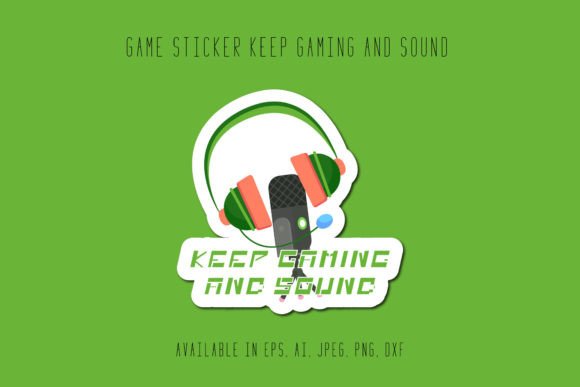
Whether you run a custom print shop, stream gameplay on weekends, or just want to personalize your gear, you know how hard it is to find a design that feels authentic. The Gaming Sticker Keep Gaming and Sound file set offers a ready-to-use graphic that speaks directly to gaming culture without being overly complicated. It’s not just another clip art file; it’s a carefully created vector and raster package built for people who actually make things. The design combines bold lettering, energetic color accents, and audio-inspired detail that works across many types of projects. Owners of small brands, Cricut hobbyists, educators running esports clubs, and YouTube creators can all adapt it quickly. You don’t need to commission a custom designer or wrestle with a low-resolution sample. Everything comes prepared at 1920 by 1280 pixels, with six different file formats so you can move straight into editing, cutting, or printing.
What You Get with This Gaming Sticker Design
When you download the set, you receive a package designed to minimize extra work. Instead of converting files or guessing about resolution, you can open the included formats and start applying them. The canvas measures 1920px by 1280px, which gives you a wide landscape ratio that works well for stickers, banners, overlays, and even Twitch panels. The package contains six distinct file types:
- 1 AI File – fully editable in Adobe Illustrator, useful for professional print setups
- 1 EPS File – openable in various vector programs, great for sign shops and older software
- 1 SVG File – ideal for Cricut, Silhouette, and other cutting machines without quality loss
- 1 DXF File – compatible with laser engravers and some CAD-based workflows
- 1 JPG File – high-resolution raster for quick web use or lightweight previews
- 1 PNG File – transparent background for layering onto merchandise mockups or streams
This eliminates the frustration of receiving a single format that doesn’t fit your tools. You can keep the editable vector files for resizing without pixelation, while the PNG and JPG let you drag and drop into simpler projects. The person who made this understood that different people work in different environments. A vinyl cutter in a home studio needs something different than a freelance social media manager making tournament graphics. Both can use the same Gaming Sticker Keep Gaming and Sound download without fighting the file type.
Where a Gaming Sticker Like This Shines in Real Life
The design works best when placed in contexts that already have a gaming or audio audience. Many people assume a sticker like this only goes on a laptop lid, but the uses go much further. The text “Keep Gaming and Sound” hints at streaming, music, and a persistent love for the hobby. That makes it suitable for audio gear cases, headset stands, or even custom panels on a streaming desk. Because the artwork scales cleanly from the large source canvas, you can shrink it down for a phone skin or blow it up for a backdrop banner. One overlooked application: event signage. A local gaming tournament organiser can take the SVG, edit the colors to match their sponsor palette, and print a few dozen signs without losing crispness. The multiple formats mean you aren’t locked into one workflow. If your main design software updates and drops support for an older format, you still have the others.
Streamers, Content Creators, and the Power of Custom Overlays
Live streamers know that small branding details add up. A custom overlay with a consistent visual theme makes a channel look intentional rather than thrown together. The Gaming Sticker Keep Gaming and Sound PNG file can drop straight into OBS Studio, Streamlabs, or any broadcasting software. You might place it in a corner during “Starting Soon” screens, use it as a webcam frame accent, or incorporate it into an alert box. Because it arrives with a transparent background in PNG format, you don’t need to spend time removing a white box. If you want to change the colors to match your channel’s palette, the AI or SVG files let you recolor vectors without degrading the image. A small-time streamer who isn’t a graphic designer can still achieve a polished look. A veteran creator might use the design as a base element to build a whole scene transition. In either case, the file set respects your time.
Small Business Merchandise That Stands Out
For a small business, putting a logo on a sticker or t-shirt isn’t always exciting. Sometimes you want to offer something that connects with a subculture your customers care about. If you run a gaming café, a repair shop, or a quirky retail store, you can turn this design into affordable stickers, keychains, or mugs. The SVG and DXF files allow cutting on vinyl plotters, so you can produce die-cut stickers right in the shop. One practical scenario: a board game store preparing for a Friday Night Magic event. They print fifty small stickers featuring the gaming phrase, hand them out with purchases, and suddenly customers are sticking them on deck boxes, laptops, and car windows. That kind of organic brand exposure doesn’t happen with a generic symbol. The visual itself says something about staying plugged in, both to sound and games. It resonates without screaming.
Bringing Gaming Culture to Events and Tournaments
Event organizers often scramble for quick, affordable visual assets. A design ready in multiple formats can reduce the last-minute rush. The 1920 by 1280 pixel canvas matches widescreen 3:2 proportions, so digital signage and social media posts need very little cropping. You can take the JPG, add event details in a free editor, and post it to an event page in minutes. For printed banners, the vector AI or EPS files can scale to several feet wide without pixelation. I’ve seen similar designs used on stage banners at local fighting game tournaments. A clean, readable statement like “Keep Gaming and Sound” offers a simple rallying phrase without dated slang. It also crosses language barriers easily, which helps if your attendees come from varied backgrounds. Because the file package includes both raster and vector options, you avoid the awkward back-and-forth with the print shop about file compatibility.
Custom Apparel for Personal Branding or Gifts
A phrase like “Keep Gaming and Sound” makes a natural fit for hoodies, beanies, or tote bags. Hobbyist heat-press owners can open the SVG in their cutting software, create a vinyl transfer, and press it onto fabric. The DXF file works well if you’re using a laser engraver to etch the design onto leather patches for hats. One interesting use: someone might make a birthday gift for a friend who runs a small music and gaming podcast. They print a custom crewneck with the design subtly placed on the sleeve. Because the design isn’t overbranded with a fictitious company logo, it feels like an inside nod rather than commercial merchandise. And if you do want to sell apparel, the straightforward rights typical with such digital products mean you can use it on items you produce without navigating complex licensing tiers. Always check the seller’s terms, but most creators offer flexible allowances for small-run physical products.
Print Shops and On-Demand Fulfillment
If you run a print-on-demand storefront, finding designs that translate smoothly across mugs, phone cases, and posters is essential. The Gaming Sticker Keep Gaming and Sound file set gives you a clean, high-resolution raster in PNG and JPG, plus editable vectors for when you need to pad or adjust for specific product templates. For example, a rectangular sticker template on a POD platform might require a slightly different composition. With the AI file, you can tweak element placement without starting from scratch. The large canvas size means you can downsize for a coaster or a magnet with no noticeable loss. Many store owners worry about DPI when placing designs on larger items like blankets or wall art. With a 1920px wide source file at a typical 300 DPI print setting, you’re looking at a clean 6.4 inches across, but because vectors are resolution-independent, you can go far larger without any quality drop. This flexibility removes a common stress point for sellers who aren’t trained graphic designers.
DIY Craft Projects and Hobbyist Uses
Beyond professional contexts, this sticker design slides nicely into weekend crafts. Someone with a Cricut Joy could produce small decals for a gaming headset stand. A parent crafting a “game night” corner in the basement might cut the design from permanent vinyl and apply it to the wall. The transparent PNG is handy for digital scrapbooking or printable sticker sheets sold on Etsy. One hobbyist I know used a similar file to create a stencil for painting a wooden sign at a maker space. They imported the SVG into a free software, mirrored it, and cut it from stencil material. The result looked hand-painted but precise. Because the artwork includes both text and subtle graphic elements, it reads well even when cut in a single color. That matters if you don’t have a multi-color vinyl setup. Simple, bold designs tend to survive the transfer tape process better than intricate ones.
What to Consider Before You Download and Use It
Before you add it to your cart, think about where you’ll actually use it. The design works best on dark or mid-tone backgrounds because the contrast helps the words pop. If you plan to print on white cotton shirts, consider whether you’ll add a bounding shape behind the artwork so it doesn’t float. Also, check the seller’s usage terms. Most digital sticker file sales allow personal and small commercial use, but you want to confirm if there’s a cap on the number of physical items you can sell or if you can use the design on print-on-demand platforms. Some sellers restrict use as a standalone digital file resale, which is standard. Another practical note: while the AI and EPS files are fully editable, you’ll need compatible software like Adobe Illustrator, CorelDRAW, or Inkscape for full control. If you don’t have those, the PNG and JPG still give you plenty to work with. Finally, consider color adjustments. The included design has a specific palette, but you can easily recolor vectors to match your brand or mood. That small step makes a mass-produced file feel uniquely yours.
File Formats and How They Simplify Your Workflow
Each format serves a distinct purpose, and understanding that can save you hours. The AI and EPS files are your editable source files. Use them when you need to change colors, resize without limit, or separate elements for different layers. The SVG is your cutting machine format: open it in Cricut Design Space, Brother CanvasWorkspace, or LightBurn, and you’ll get clean cut lines ready to go. The DXF file plays well with older CNC machines and some laser cutters that don’t like SVG. If you only need a quick visual for a social post, the JPG loads fast and works everywhere. The PNG is the go-to for layering because the background is already removed. I’ve seen people waste time trying to convert a JPG into a cut file with auto-trace, only to get jagged edges. Starting with an SVG from the same product avoids that entirely. Having all these options in one download means you don’t need to go back and forth asking for an additional format.
Working with the Included Canvas Size and Scalability
At 1920 by 1280 pixels, the base canvas isn’t accidental. It matches a common widescreen proportion while giving enough height for the graphic to breathe. When you open the raster files, you see the artwork at a size that works for digital screens natively. But remember that vectors don’t care about pixel dimensions. You can take the AI or SVG file and make the design 10 inches tall or 10 feet tall. This matters when you send a design to a sign shop accustomed to working in actual inches or millimeters. You won’t get that dreaded email asking for a “higher resolution” version. If you do use the PNG for print, calculate your effective DPI. At 12.8 inches wide (dividing 1920 by 150 DPI, for example), you’d have decent quality for many applications. For large-format printing, always default to the vector files. That alone makes this file set more useful than a single JPG download that looks great on screen but turns to fuzz on a banner.
Every day, people look for Gaming Sticker Keep Gaming and Sound not because they need a generic sticker, but because they have a specific project in mind that needs an authentic gaming-related graphic. The design carries a vibe that works equally well in a gaming den, a student’s dorm, a podcast studio, or a retail pop-up. Because you receive multiple formats instead of a half-baked single file, you can move between cutting, printing, web use, and engraving without hunting for conversions. The large canvas, editable vectors, and clean raster exports reflect a product built for makers, not just for one-time decorators. If you’ve already imagined where it would look right on your gear or in your shop, you’re ready to start creating.