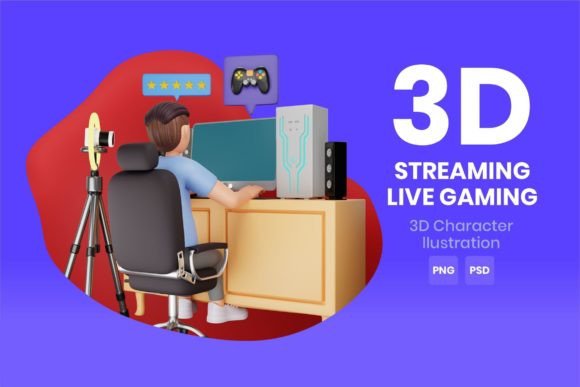
Streaming Live Gaming 3D Character: Avoiding the Hidden Traps in Your Visual Brand
You see the polished VTubers and streamers with fluid motion and eye-catching designs and think buying a Streaming Live Gaming 3D Character will instantly set you apart. It can, but only if you understand the files you're actually receiving and how to use them. Many first-time buyers chase the flashiest preview image and end up with a folder of renders they can’t apply in real time. This isn't about discouraging you. It’s about making sure you invest in a visual asset that fits your actual workflow, whether you’re a solo content creator, a small marketing agency, or an established brand looking for a mascot.
A polished Streaming Live Gaming 3D Character Illustration often arrives as a bundle of meticulously crafted high-resolution assets. You might see terms like 4K renders, PNG transparent files, and layered PSDs. Each of these serves a completely different purpose, and mixing them up costs time and money. By understanding these formats and sidestepping the most common oversights, you can avoid the frustration of owning a stunning character that stays buried on your hard drive.
The Static Trap: Confusing a Rendered Image with a Rigged Avatar
The single biggest misunderstanding is thinking a high-quality 3D render means you’re getting a ready-to-animate model. A Streaming Live Gaming 3D Character sold primarily as a 4K render, even with a PSD file, is a pre-lit, pre-posed illustration. It’s a still snapshot from a 3D scene. It is absolutely not a FBX, VRM, or Live2D-ready file. Attempting to animate a flat PNG or a layered PSD in live streaming software like VSeeFace, Animaze, or Live2D Cubism will fail because those files lack the underlying mesh, bones, and blend shapes required for real-time motion capture.
This mistake usually happens when a marketplace listing uses phrases like "perfect for streaming" without specifying it's for overlay graphics, alerts, or thumbnail artwork, not for facial tracking. The result? A creator buys a visually stunning character, plans a debut stream, and then discovers they only have static images. To avoid this, always check if the product description mentions rigging, rigged models, or real-time animation compatibility. If you see only output formats like PNG, JPG, or PSD, assume the character is static until proven otherwise. For a true Streaming Live Gaming 3D Character you can control, you need a purpose-built model file, not just a beautiful illustration.
Overlooking the Power of the PNG Transparent File
If you do invest in a high-quality render pack, the transparent PNG is not just a secondary bonus. It’s the most flexible asset you own. Some streamers ignore it, using the flattened 4K wallpaper instead for scene overlays, which leads to awkward rectangular boxes sitting on top of gameplay. A proper PNG with a clean alpha channel lets you integrate the Streaming Live Gaming 3D Character seamlessly into your streaming layout, webcam frames, and intro screens without a visible background clash.
The mistake comes from rescaling without understanding resolution. You receive a 4K render, but then downscale it haphazardly in OBS or Streamlabs, introducing aliasing and blur. Alternatively, you might place the high-resolution artwork on a 1080p stream without resampling, eating up unnecessary GPU resources. Always match your source asset’s resolution to your canvas. If you stream in 1080p, resize the 4K PNG within your broadcasting software to fit your frame cleanly, or better yet, prepare pre-scaled versions in an image editor first. This preserves the crisp edges that make Streaming Live Gaming 3D Character Illustration Included File - High Quality Renders 4K truly stand out.
Dismissing the PSD File as Unnecessary Fluff
Many buyers see a PSD file and think, "I don't edit photos, so this is useless." This is a missed opportunity that can damage brand consistency. A well-structured PSD often contains separate layers for shadows, highlights, background elements, and even color-coded parts of the character’s outfit. Without it, you’re stuck with the render’s default lighting and color palette. If your brand colors shift or you want a seasonal variant, you’ll have to commission a completely new piece.
When you don’t use the layered source file, you might end up applying garish filters over a flattened image, which muddies the professional look. Instead, a sponsored stream might clash because the character’s glowing eyes can’t be isolated and changed to fit a partner’s brand style. Using the PSD, even with basic Photoshop or GIMP skills, you can tweak specific elements, extract the character to create custom text separators, or generate crisply downscaled assets for emotes and badges. The Streaming Live Gaming 3D Character Illustration Included File - PSD Files offer future-proofing. If you ignore them, you’re discarding the blueprint of your own asset.
Mistaking Quantity of Files for Quality of Use
A common misstep is evaluating a package solely by how many files are in the zip. You might see "50 included files" and assume you’re getting a versatile toolset. But if those 50 files are just redundant exports like ten JPEG variations, five small PNGs with different compression, and fifteen tiny icon crops, you’re still missing meaningful content. Check the substance. A valuable bundle for a Streaming Live Gaming 3D Character will explicitly list a true 4K master with uncompressed fidelity, an intact transparent PNG for compositing, and an organized PSD. Anything less specific might be padding.
The practical correction is to inspect sample file trees or preview images before buying. Look for evidence that the PSD layers are named and logical, not just a single layer with the final image. If a vendor offers a screenshot showing organized groups for "face," "body," "props," and "shadows," you have a professional-grade illustration file. If all you see is a flat JPEG preview repeated, you’re probably buying a bulk render dump with limited editing potential.
Neglecting Commercial and Usage Rights Until It’s Too Late
A beautiful Streaming Live Gaming 3D Character illustration might land you in legal trouble if you use it for monetized streams without checking the license. The frustration arises when a creator attaches the character to their entire channel identity—Twitch panels, YouTube thumbnails, merch mockups—only to discover the original license forbids commercial use or derivative works. This can force a costly rebrand or a retroactive purchase of an extended license at a much higher fee.
Before you hit download, look for clear license terms. Does the standard package allow for live broadcasting with donations, subscriptions, and sponsorships? Can you modify the PSD to create merchandise, or is the artwork strictly for on-screen digital use? If the license doesn't explicitly grant you commercial streaming rights, you’re gambling. Safer packages often include a separate commercial use clause or offer an upgraded license. Reputable creators of Streaming Live Gaming 3D Character assets make these rights easy to find; vague wording is a warning sign. Always save a copy of the license agreement linked to your proof of purchase.
Applying the Asset Without Proper Color Management
You’ve secured your 4K PNG and PSD, but the colors look washed out on stream. This often happens when moving between software that processes color differently. A render created in a wide-gamut color space and exported without sRGB embedding might appear vibrant in Photoshop but flat in OBS. Conversely, pushing a saturated character onto an already bright game feed can turn a stylish Streaming Live Gaming 3D Character into a glowing distraction that viewers find uncomfortable.
Instead of cranking the saturation in your streaming overlay, calibrate your export. Open the PNG in your editor, confirm it’s using the sRGB profile, and do a test recording. Place the character next to gameplay and a face cam. If it looks radioactive or muddy, dial back the opacity slightly or use a soft LUT correction. The goal is a cohesive frame, not a character that fights for attention with the actual content. A tastefully integrated character illustration builds a professional atmosphere much faster than one that screams "check out this cool asset I bought."
Checklist Before Committing to a Purchase
To sidestep regret, pause before clicking buy and run through a short mental audit. Your specific needs may differ, but the fundamentals remain consistent.
- Primary use intent: Is this for real-time animation, static branding, or both? If you need a rigged model, does the description confirm a compatible file type like VRM or FBX?
- File inventory: Are the core promised formats—especially the 4K PNG with transparency and a layered PSD—clearly stated, or are they buried in vague marketing language?
- Layer preview: Can you see a glimpse of the PSD structure? If the seller hides this, you might receive a poorly organized file that’s painful to edit.
- Commercial rights: Does the standard license cover live streaming, video-on-demand, and modifications? If you plan on merch, is that allowed or do you need an extended option?
- Color consistency: Do you have the basic tools (even free ones like GIMP) to conform the asset to your stream’s visual style without degrading the 4K fidelity?
- Support and updates: Will you be notified if the creator updates the file or fixes a layer issue? A static asset rarely needs updates, but transparency from the seller about file integrity is a good sign.
Thinking through these points takes minutes and can save you from becoming another voice in a forum asking how to convert a PNG into a moving avatar. A Streaming Live Gaming 3D Character illustration bundle is a powerful branding tool when you treat it as exactly what it is: a high-fidelity static asset meant to elevate your channel’s visual identity, not replace your motion capture pipeline.
Making the Asset Work Across Your Content
Once you have the correct expectation and the right files, extend their use thoughtfully. The same Streaming Live Gaming 3D Character Illustration Included File - High Quality Renders 4K can become your offline screen, alert badge, podcast cover art, and social media rebrand. The transparent PNG can overlay onto short-form video backgrounds, and the PSD allows you to create themed versions for holidays without hiring a redesign. This layered approach delivers far more value than passively slapping the raw JPEG onto your stream.
Avoid the trap of taking the 4K file and squashing it into a tiny chat badge without first creating a properly resized version. Tiny text near a downscaled character may become illegible. Always step back and view the result at the actual display size your audience will see. If a detail gets lost, simplify that element in the PSD before exporting a smaller variant. This attention to detail separates a forgettable overlay from a channel design viewers remember.
When you treat your Streaming Live Gaming 3D Character as a core visual asset with specific strengths and limitations, you won't waste energy trying to force it into roles it wasn't built for. You’ll spend less time troubleshooting and more time connecting with your viewers, confident that your graphics hold up under scrutiny.