What Makes a Glowing Gaming Text Effect a Smart Choice for Designers and Content Creators
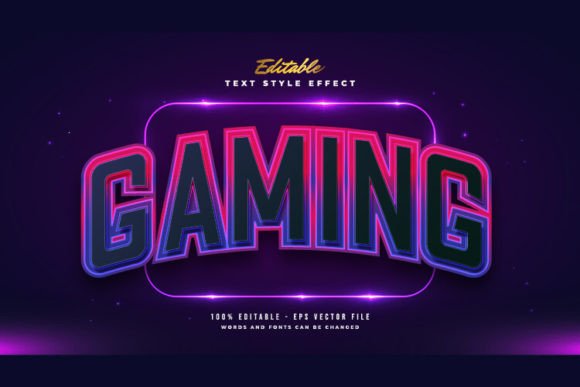
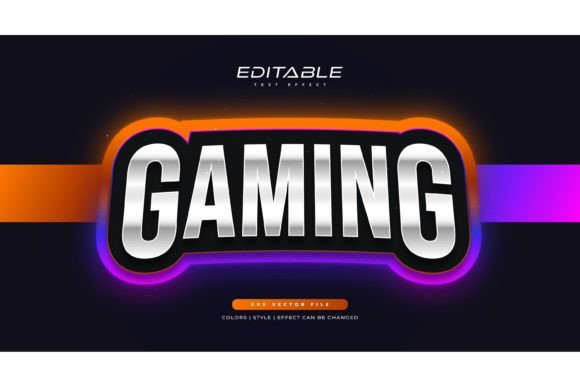
Typography plays a central role in visual storytelling, especially when the project calls for energy, motion, and a futuristic atmosphere. A Glowing Gaming Text Effect is a pre-built Adobe Illustrator text style that lets you apply luminous, neon-like finishes to any word or phrase without manually constructing the glow from scratch. Instead of spending hours layering gradients, blurs, and highlights, you simply open the file, type your text, and the effect renders instantly. This specific product includes 100 editable words, full control over fonts and size, and comes with both EPS and JPG preview files. It is important to clarify upfront: this is not a downloadable font file. You are getting a layered effect template that works with any typeface you already own or choose to install.
For people comparing design tools, this type of resource occupies an interesting middle ground between fully custom illustration work and one-click online generators. Understanding where it fits, what it does well, and where you might need something different can save time and money while helping you produce better results.
Understanding What the Glowing Gaming Text Effect Actually Is
At its core, this product is an Adobe Illustrator Text Style Effect—a structured, editable file that applies a neon glow treatment to editable text layers. The glow effect mimics the look of backlit signage, arcade cabinets, or streaming overlays. Because the file is built in Illustrator, the text remains fully editable. You do not need to rasterize words or commit to a specific font before opening the template. You click on the text layer, replace the placeholder with your own content, and the glow, reflections, and color gradients adjust automatically.
The package contains 100 pre-set words, which serve as starting points. You can keep, modify, or delete them entirely. The effect works with any font you prefer, whether it is a bold esports-style sans-serif or a more stylized display typeface. This flexibility matters for designers who work across multiple brand identities and cannot afford to lock themselves into a single typographic look.
How This Editable Effect Compares to Other Text Styling Approaches
When evaluating how to achieve a glowing text look, most people encounter three broad paths: building the effect manually, using an online text generator, or working with a pre-made template file like this one. Each approach has distinct strengths and tradeoffs that affect workflow, quality, and creative control.
Manual Creation in Adobe Illustrator or Photoshop
Creating a neon glow from scratch gives you total command over every aspect of the design. You control the light spread, color transitions, shadow depth, and secondary reflections. For highly customized projects or designs that need to match an exact art direction, manual creation is often the preferred method. The tradeoff is time. Building a polished, multi-layered glow effect can take anywhere from 30 minutes to several hours depending on complexity. For someone producing weekly YouTube thumbnails or multiple social media graphics per day, that time adds up quickly.
Online Glow Text Generators
Browser-based text generators offer speed and convenience. You type your words, pick a preset style, and download a rasterized image. These tools work well for one-off needs or situations where you do not have access to professional design software. However, the output is usually a flat PNG with limited resolution flexibility. You cannot easily return to the file later and change a single letter or adjust the glow intensity without starting over. For print projects or high-resolution displays, the rasterized format can become a limitation.
Editable Adobe Illustrator Text Effect Templates
This is where the Glowing Gaming Text Effect product sits. It combines the editability of a native Illustrator file with the speed of a pre-built solution. Because the text remains live, you can change words, fonts, and sizes at any point in your workflow. The effect layers remain intact, so you can also recolor the glow, adjust opacity, or tweak blending modes to match your brand palette. The included EPS file provides cross-application compatibility with other vector editing software, while the JPG preview gives a quick reference without opening the design program.
Key Strengths That Set This Product Apart
Several practical benefits make a template-based approach worth considering, especially for users who produce content regularly or manage multiple design projects simultaneously.
Time efficiency with repeatable results. Once you load the file, applying the glow effect takes seconds. For batches of social media graphics, event banners, or merchandise mockups, this consistency saves hours over a month of work.
Non-destructive workflow. Every element remains editable. You can experiment with different typefaces, adjust kerning, or rewrite the text completely without rebuilding the effect. This flexibility supports iterative design processes where client feedback often requires multiple rounds of changes.
Scalability without quality loss. Because the effect is vector-based, you can scale the design to billboard dimensions or shrink it for a mobile icon without pixelation. The EPS format preserves paths, gradients, and transparency, making it suitable for both screen and print applications.
Learning resource potential. For designers who want to understand how professional glow effects are constructed, opening the layers panel and examining the gradient combinations, opacity settings, and blending modes provides a practical education. You can reverse-engineer techniques and apply them to original projects later.
Realistic Limitations and When You Might Need Another Option
No single resource fits every use case perfectly. Understanding the boundaries of what this Glowing Gaming Text Effect offers helps prevent wasted effort and unrealistic expectations.
The effect is optimized for Adobe Illustrator, which means users need access to the software and some basic familiarity with its interface. Complete beginners may face a short learning curve when navigating layers and text tools, though the easy-to-edit, just-click-and-change nature of the file reduces this barrier significantly compared to building effects from scratch.
While the glow style is cohesive and professional, it represents a specific aesthetic. If your project requires a subtle, understated text treatment or a completely different lighting direction, this template may not align with your vision. The effect leans into a vibrant, high-contrast gaming and esports look, which works brilliantly for YouTube thumbnails, stream overlays, tournament graphics, and gaming channel branding, but may feel out of place for a luxury brand identity or a minimal editorial layout.
Another consideration involves color customization. The effect supports recoloring, but complex multi-color gradients may require intermediate Illustrator skills to modify smoothly. Users comfortable with the appearance panel and gradient editor will find the process straightforward. Those less experienced might need to invest time learning these tools to achieve specific color outcomes.
Practical Use Cases Where This Effect Excels
The gaming and streaming community represents an obvious audience, but the applications extend further than many people initially assume. Content creators across platforms use glowing text effects for thumbnail designs where catching a viewer's eye in a crowded feed directly impacts click-through rates. The luminous quality creates visual separation from background imagery, making words readable even at small preview sizes.
Event promoters find value in the effect for esports tournament posters, gaming convention banners, and late-night event flyers. The neon aesthetic communicates energy and nightlife associations effectively. Small business owners in adjacent industries—arcade bars, gaming cafés, retro-themed restaurants—use similar effects for window signage and social media promotion.
Print-on-demand designers incorporate glowing text effects into apparel graphics, especially for merchandise aimed at gaming communities. The vector format ensures the design meets production requirements for screen printing or direct-to-garment methods without resolution concerns.
Factors to Weigh When Choosing Between Similar Text Effect Products
If you are comparing multiple editable text effect templates, several criteria can guide your decision beyond just visual preference.
Format compatibility. Ensure the product delivers in a format your software can open. The combination of EPS and JPG provides wide support, but check if you need AI, PSD, or SVG files for your specific workflow.
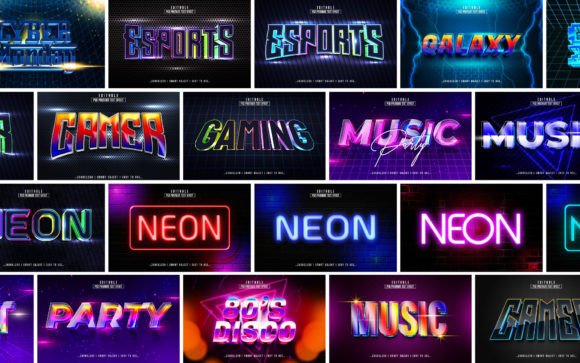
Number of included styles. Some products offer multiple glow variations—different color palettes, light directions, or intensity levels—within a single package. Evaluate whether you need variety or if one well-crafted style suffices for your projects. This product focuses on delivering a cohesive set of 100 editable words, which suggests consistency across a large word set rather than multiple stylistic variations.
Font and text editability. Confirm that the text layers are truly live and not outlined or flattened. The product description emphasizes that you can change or use any font you like and that editing requires just clicking and changing the texts. This live-text feature distinguishes it from effects applied to outlined shapes where typographic changes become impossible without redoing the work.
Licensing terms. Review whether the license covers commercial use, the number of end products allowed, and any restrictions on redistribution. Most textured effect templates allow broad usage in client work, but checking specifics prevents complications later.
File organization. Well-structured layers and clearly named groups make a significant difference in editing speed. A template where you can quickly locate text layers, background elements, and effect groups saves frustration during tight deadlines.
How to Approach Editing and Customization Thoughtfully
Working with a pre-made effect does not mean accepting the default result. Small adjustments can make the output feel original and aligned with your brand. Start by selecting a font that matches your project's personality. A geometric sans-serif conveys a different energy than a rounded, playful typeface, even with the same glow treatment applied.
Experiment with glow colors strategically. Warmer tones like oranges and pinks create an inviting retro arcade feel. Cooler blues and teals suggest a sleek, cyberpunk atmosphere. The effect layers give you access to individual glow components, so you can intensify outer halos, soften inner highlights, or add secondary color casts that echo your brand palette.
Pay attention to background context. A glowing text effect looks dramatically different on a dark background versus a busy photographic scene. Testing the text against actual imagery early in the process prevents rework. The JPG preview file included in the package serves as a quick reference for how the effect renders in a flat presentation, but your specific use case will benefit from context testing.
Who Benefits Most from This Type of Resource
Designers who handle multiple clients or produce high-volume content gain the most practical advantage. The time saved per project compounds significantly when applied across ten, twenty, or fifty designs per month. Small business owners without dedicated design teams also benefit because the template bridges a skill gap without requiring advanced Illustrator expertise.
Beginners learning Illustrator find value in deconstructing the effect to understand professional techniques. The organized layer structure acts as a learning tool, showing how multiple glow layers interact to create depth and realism. This educational aspect provides long-term value beyond the immediate design output.
Conversely, experienced illustrators who enjoy building effects from scratch and have developed efficient personal workflows may find a pre-made template less necessary. Their value calculation shifts toward maintaining complete creative control rather than saving production time. Similarly, projects requiring bespoke, hand-drawn neon lettering or highly specific art direction will likely need a custom approach from the start.
Making an Informed Decision for Your Next Project
Choosing whether to invest in a Glowing Gaming Text Effect template comes down to how you value time, consistency, and creative flexibility. If your work repeatedly calls for luminous, high-energy typography and you need to produce results quickly without sacrificing editability, this type of Adobe Illustrator Text Style Effect offers a practical solution. The inclusion of 100 editable words, the ability to use any font, and the straightforward just-click-and-change workflow make it accessible to a range of skill levels.
If your needs are occasional or your design vision requires a completely custom glow direction, allocating time to learn manual effect creation or commissioning a specialist may yield results better suited to those specific goals. The right choice balances project requirements, available time, budget, and the level of customization you genuinely need.
Evaluating the product on its actual capabilities—rather than expecting it to function as a universal solution—leads to more satisfying outcomes. A well-chosen text effect template becomes a reliable tool in a designer's workflow, one that handles repetitive tasks efficiently while freeing up mental energy for the creative decisions that truly distinguish great work from adequate work.